
The Facebook application DealTab makes it a breeze to add a “Deals / Coupons” tab to your restaurant’s Facebook page powered by your OpenMenu.
note: DealTab (and other Facebook Apps) will only work on business type pages. Also, DealTab must be setup by the page creator / admin.
Follow these simple steps:
1. Add DealTab to Your Restaurant’s Page (must be logged in as the Admin of your restaurant’s page)
2. Select Edit Settings after clicking the new Deals / Coupons tab (has the orange Deal Icon)

3. Set the OpenMenu ID – format is aaaaaaaa-bbbb-cccc-dddd-eeeeeeeeeeee

If you don’t know your OpenMenu ID read about Locating Your OpenMenu ID.
note: compact view shows only the title of your restaurant’s deal or coupon
4. Press Save -> Close. Now refresh your page and your deals and coupons should be displayed.
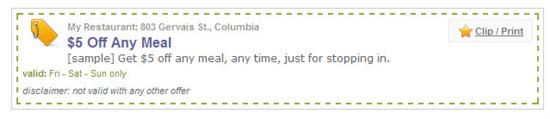
note: you can also have your deals displayed above your menu using our OpenMenu Tab Facebook App. One of the options is to show/hide deals. This will display your deals above your menu so all information from OpenMenu is displayed in a single page tab.
Pingback: Displaying Your OpenMenu in Facebook – OpenMenu Help