
• Home
  • Get My Restaurant Listed
OpenMenu Help
  • Home
  • Get My Restaurant Listed

Creating a vanity URL / vanity ID for your restaurant

/1. Account Settings /Creating a vanity URL / vanity ID for your restaurant
  • January 14, 2017
  • OpenMenu

Vanity IDs let you replace the OpenMenu ID issues with an OpenMenu ID that better represents your restaurant (like: My_Restaurant or PizzaPlace or starbucks_seattle).

Steps:

1. Select the ‘Set Vanity ID’ from either the main page where you edit your restaurant’s information or the page where access the addons.
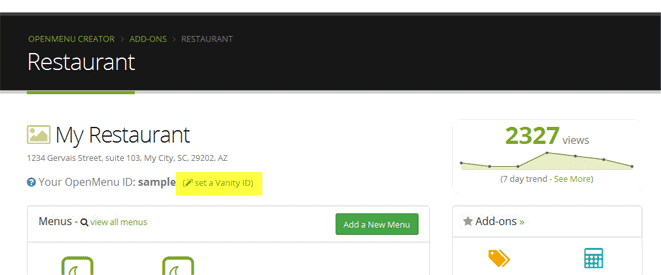

-or-
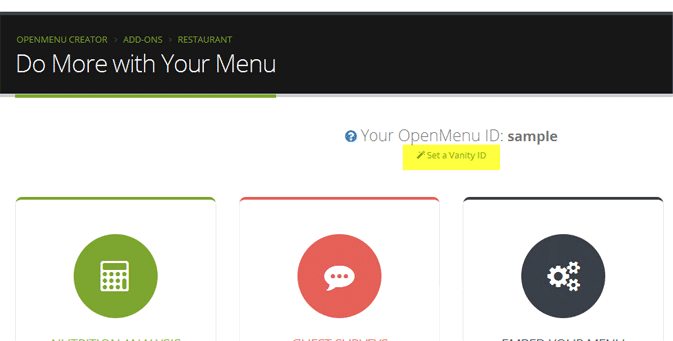
2. Set your Vanity ID and confirm that you understand that once set it cannot be changed.  Press Set & Save and you’re done.
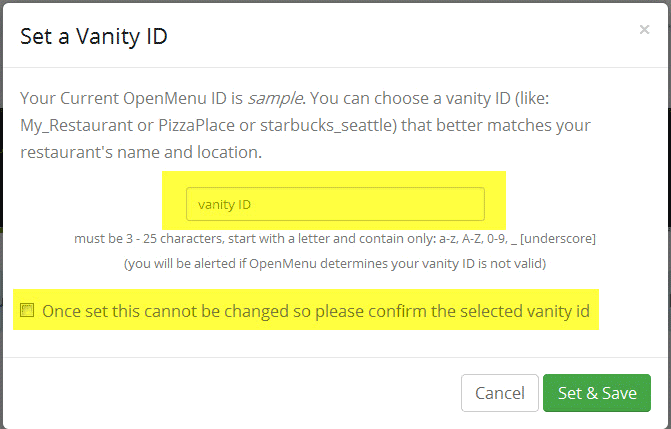
3. Your selected Vanity ID will replace the issued OpenMenu ID.  Use this OpenMenu ID as normal in our solutions.


note: Vanity IDs come with a  premium plus upgrade

Related Articles

  • How do I tax menu items differently?

  • Changing or adding a new credit card to your account

  • Editing How Many Restaurants I Manage

  • How do I manage multiple restaurants in my account?

  • Updating Your Restaurant’s Map Location

  • How to use your domain with our website

Comments

  1. Pingback: What are the different OpenMenu URLs for my restaurant? – OpenMenu Help

Latest Articles

  • How do I tax menu items differently?
  • Embedding OpenMenu Ordering in Your Website
  • Getting Started with Online Ordering
  • Connecting your Yext Account to OpenMenu

Popular Articles

  • Displaying Your OpenMenu in Facebook
  • When / How Do I Submit My OpenMenu
  • Adding Your First Restaurant
  • Supported Languages by our Menu Translator

Need Additional Help

Looking for help and couldn't find an article here? Please contact us and let us help.

© 2009 - 2017, Open Menu, LLC All rights reserved.